local-development-setup
Local Setup & Development
This section is for developers contributing to TRMR or those who wish to build and run the extension from source.
To set up TRMR for local development:
-
Clone the repository:
git clone https://github.com/TRMRai/TRMRai.git
cd Roo-Code -
Install dependencies: TRMR uses
pnpmfor package management.pnpm install -
Run the extension for development: You have two primary methods:
-
Directly in VS Code (Recommended for active development):
- Open the cloned
Roo-Codefolder in VS Code. - Press
F5(or select Run → Start Debugging from the menu). This opens a new VS Code window (Extension Development Host) with TRMR running. - Changes to the webview code (under
webview-ui/) will often update live. - Changes to the core extension code (under
src/) typically require restarting the Extension Development Host window.
- Open the cloned
-
Building and Installing a VSIX package: This method is useful for testing the packaged extension or distributing development builds.
-
Build the VSIX file:
pnpm buildA
.vsixfile (e.g.,roo-cline-<version>.vsix) will be created in thebin/directory. -
Install the VSIX in VS Code:
-
Using the command line:
code --install-extension bin/roo-cline-<version>.vsix(Replace
<version>with the actual version number in the filename). -
Using the VS Code interface:
- Open the Extensions view (
Ctrl+Shift+XorCmd+Shift+X). - Click the "..." (More Actions) menu in the Extensions view sidebar.
- Select "Install from VSIX..."
- Browse to and select the generated
.vsixfile from thebin/directory.
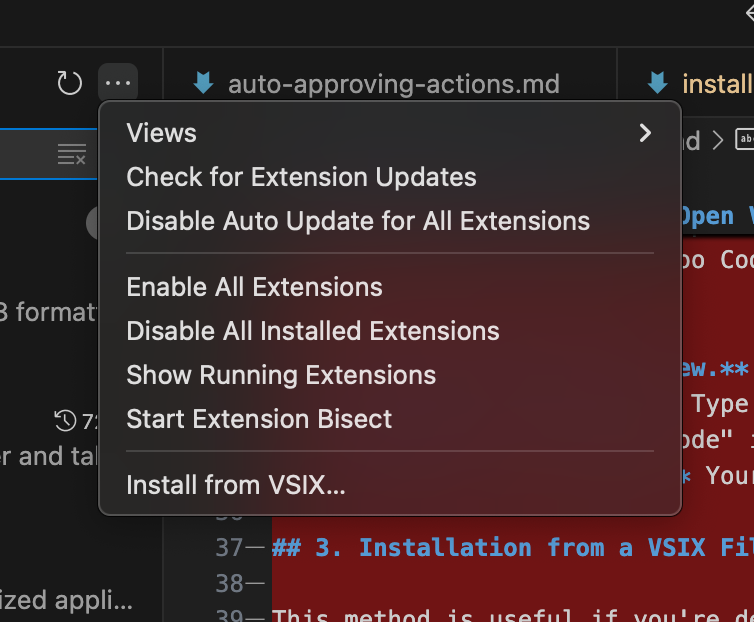
Installing a development VSIX using VS Code's "Install from VSIX..." dialog.
- Open the Extensions view (
-
-
-